Legendary car designer Henrik Fisker launched his comeback with the Force 1 in January — a $230,000 luxury sports car.
But Fisker isn’t planning on stopping with the Force 1. He’s already designing the next car to sell under his new company, VLF Automotive, based in Detroit. And the car designer is interested in pursuing electric cars again and ones with autonomous features down the road.
„What is the next vehicle out there in terms of electric cars and autonomous driving?“ Fisker told Tech Insider. „I’m spending a lot of time in that area and what that means in the future.“
Fisker said he’s interested in designing electric cars, as well as vehicles with autonomous features, but he declined to comment on whether or not he would ever actually pursue either one.
Before the Force 1, Fisker got his name in the car industry as a designer for BMW, Ford, and Aston Martin. He did initial design work for the Tesla Model S sedan. But when he broke off to design a hybrid dubbed the Fisker Karma, Tesla filed a suit alleging he copied some of Tesla’s technological innovations for the Karma.
An arbitrator eventually ruled in favor of Fisker. But Fisker Automotive went bankrupt in 2011, making the Karma a distant memory. Although Fisker Automotive went bankrupt, the Karma is a big reason Fisker is interested in entering the electric car market.
A new kind of electric car
„I’m passionate about it because when I brought out the Fisker Karma, it was clear people thought, ‚Well, an electric car, even with a range extender, can be sexy and amazing,'“ he said. „Obviously, we had a major battery problem and that’s what brought Fisker Automotive down. But today we have the battery technology that has gone a lot further.“
Fisker said he wants to design a car that isn’t a traditional electric, four-door sedan. Fisker said he would want to „make a completely new car, with new proportions and a different design.“
„We still haven’t seen any cars take advantage of the electric powertrain in terms of how you proportion an electric vehicle versus traditional vehicles,“ he said. „Yes there’s electric cars, but they haven’t really done it in a beautiful way.“
Fisker would also want the electric car to „truly move the needle,“ he added.
That sounds similar to what secretive, electric car start-up Faraday Future is going for. Faraday Future teamed up with Aston Martin to make „a range of next-generation connected electric vehicles.“
Faraday Future’s concept car.Rob Ludacer
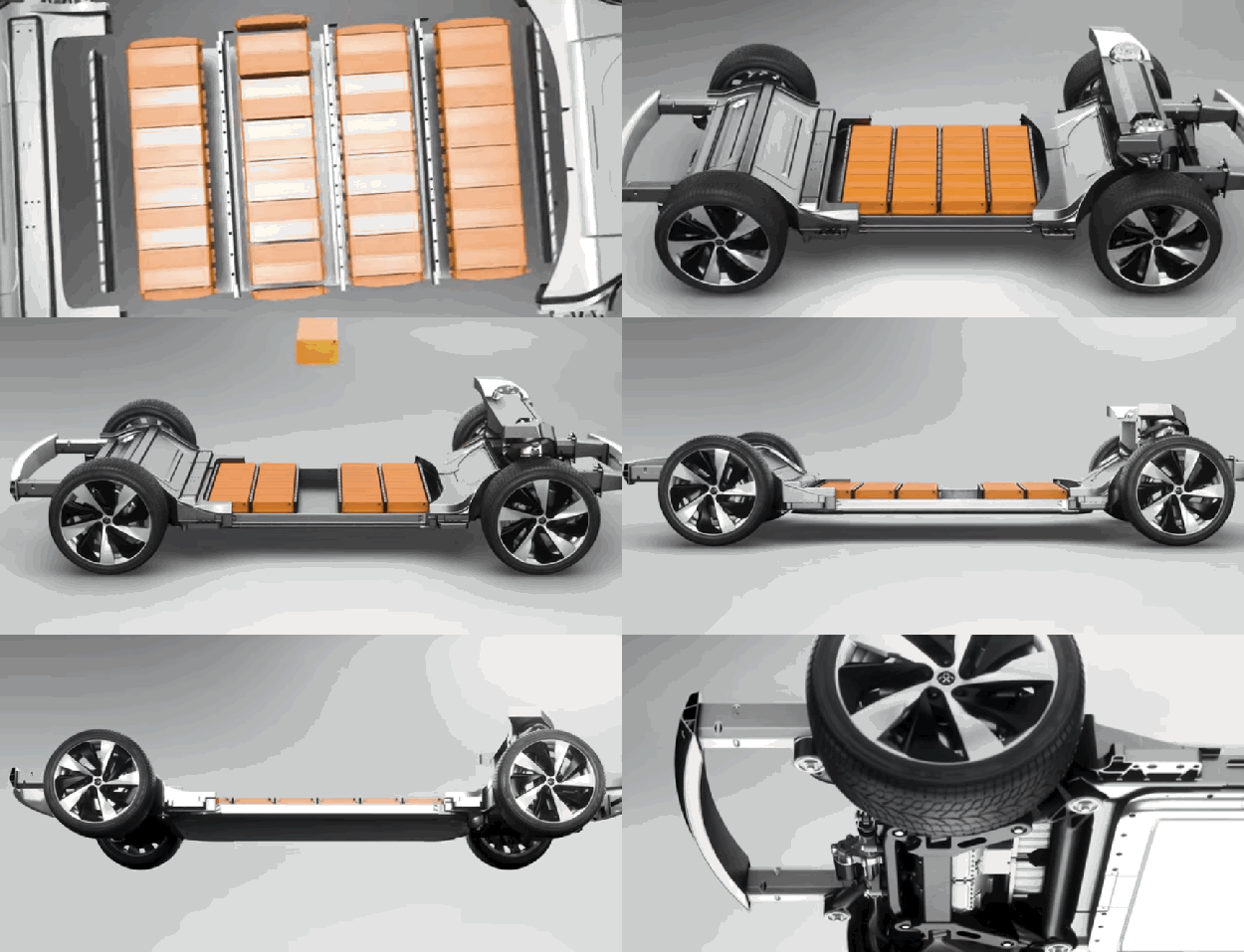
The start-up is also using a Variable Platform Architecture (VPA) — a modular platform designed specifically for electric vehicles. The technology allows the chassis to be easily adjusted by changing the lengths of the rails and other structures:
Using a VPA allows Faraday Future more flexibility in designing a variety of cars.
Autonomous cars will completely change car design
Electric powertrains, though, aren’t the only technology reshaping car design.
Fisker said that autonomous cars excite him because they open up all kinds of new opportunities for new ways to design a car.
For example, self-driving vehicles allow car makers to totally rethink the interior design of a vehicle. Fisker didn’t give specifics, but we’ve seen automakers experiment with building sofasand TVs into the interiors of autonomous cars.
„No one right now has any particular advantage in this space because no one has done it before. No one truly understands what the consumer wants,“ he said. „I just generally think the technology is enabling new ventures to take a new shot of what a car is.“
So when could we see a car from Fisker with autonomous features? Fisker is remaining hush on the subject.
„I’m definitely thinking about it,“ he said. „And it’ll probably be in the next two to three years that we’ll see the biggest changes in the car industry, maybe ever.“
It’s happened: Millennials (by most definitions, those born between 1980 and the late 1990s) are now the largest generation in the U.S. workforce. And they’re no longer the generation waiting in the wings to become leaders—they’re already increasingly entering senior and managerial positions.
Along with this influx of young managers comes a shift in the role of manager itself. Managers are no longer only focused on making sure work gets done, but also on how and why it gets done. They are expected to be detail-oriented and strategic, to build culture and ensure productivity. And their position is also pivotal for employee engagement: A recent Gallup poll found that managers accounted for 70% of variance in employee engagement.The good news? This new generation appears up for the challenge. But companies must also find ways to develop and retain these new managers. Recent data released in the 2016 Deloitte Millennial Survey points to evidence that companies will have to make significant changes in how they develop this generation to meet the challenges that managers will face in the future.
Millennials are a dynamic generation. They are less likely than their predecessors to remain in one organization for a long period of time. They are looking for more flexible work hours, and look for organizations whose culture reflects caring towards both employees and the world around them. They aren’t afraid to leave a job if they feel their skills are not utilized or their principles are not matched.
Preventing this exodus of potential leaders has become a business-critical challenge for organizations. According to the Deloitte survey, of the Millennials likely to leave their organizations in the next two years, 71 percent are unhappy with how their leadership skills are being developed.
Getting talent development right will be crucial both for retaining this generation of managersand flipping the switch on engagement for the rest of your workforce. Here are the major shifts that need to take place:
1) Deliberately devote more time to developing leadership skills.
Deloitte found that the most loyal Millennials experience high levels of support and/or training for pursuing and managing leadership roles. Take a look at the volume of opportunities available for young managers to develop their leadership skills. Are there programs in place? Are young managers encouraged to pursue these opportunities? Is there explicit encouragement to experiment with new skills once they return from these programs? Setting aside the time and resources for leadership development shows a commitment to young managers and is likely to get commitment in return.
2) Leadership development programs should reflect the preferences of the generation: more collaborative, team-based, and decentralized.
The Millennial preference for creative, inclusive cultures over authoritarian ones extend from their work days to professional development opportunities themselves. Some development programs rely on the knowledge of a leadership “guru” speaking at the front of the room and passing on knowledge to a captive audience. This generation’s preferences, however, suggest that a program can be designed where participants experience more collaborative problem-solving and autonomy to decide how and what they need to learn. Even those programs that don’t portend to be spouting knowledge from one single person into the awaiting minds of managers may need to shift in the direction of more flexible and collaborative.
3) Weave mentorship into the fabric of your culture and your development programs.
An oldie but a goodie, mentorship still makes a difference. Not only will Millennial managers need mentorship to learn the skills and political know-how that long years of tenure used to ensure, but they’ll also be more likely to stay with the organization. According to Deloitte, respondents who planned to stay with their companies for more than five years were twice as likely to have a mentor. Programs and cultures that make mentorship a deliberate and important component have a better chance of retaining this new generation of managers.
4) Social impact activities can become team building opportunities and arenas to practice leadership skills.
Why not combine the Millennial desire to join businesses that understand their impact with their need to develop skills that will help them as leaders? Embed a volunteer experience or an activity that gives back to the community in some way into your company’s strategy to develop young leaders. Not only will you show a commitment to your community (something that this generation looks for), but you will also provide a concrete learning experience for participants to look back on as leaders.
5) Develop skills for dialogue to enable Millennial managers to enact the work culture they seek.
In terms of employee engagement, good communication from managers is essential. Leaders in talent development are already honing in on communication skills as one of the most importantdevelopment opportunities for managers of the future. The role of translator and psychologist that middle managers often need to play are well served by a capacity for communicating well with employees. Skills for dialogue – active listening, powerful questioning, and personal engagement – can be developed via collaborative learning experiences and encouraged around the workplace. If dialogue becomes the norm, Millennial managers will start to build the culture they seek and contribute to their organizations in a very meaningful way.Millennial managers are poised to fill the leadership gap left in the wake of waves of baby boomer retirements, and the impending challenge is to both retain and develop these fresh leaders. Organizations will need to make adjustments for this generation or risk losing talent that no longer accepts the principle of long-held tenure or hierarchical advancement. As this generation ages, we may see just how different leadership looks. For now, it’s crucial to provide the right opportunities and climate for that new style to grow.
Automakers are pushing bold, innovative ideas forward with their latest concept cars.
Rob Ludacer
Whether it’s a car with nothing inside but a sofa and TV or an electric car resembling the Batmobile, concept cars give us a glimpse of how technology will shape the future of driving.
1. Volkswagen unveiled a microbus concept meant to give a modern spin to the classic Volkswagen bus at the Consumer Electronics Show in January.
Volkswagen
Called the BUDD-e, the electric car gets up to 373 miles of range.
The doors open with a simple wave of the hand, and you can control the console’s interface by making hand gestures.
Volkswagen
You can also use the interface to control things like the temperature and lighting in your house.
2. The big unveiling to come out of the Consumer Electronics Show was Faraday Future’s concept car, the FFZERO1.
Rob Ludacer
It can go from zero to 60 miles per hour in under three seconds.
Four motors placed over each wheel give the car a top speed of 200 miles per hour. It’s also capable of learning the driver’s preferences and automatically adjusting the internal settings.
Faraday Future
Although Faraday Future plans to release a production car in 2020, the FFZERO1 is just a show car.
3. LeEco, a Chinese tech company, unveiled its Tesla killer concept car at the Consumer Electronics Show.
The six seats inside can be adjusted 30 different ways, and there’s entertainment consoles on the back of four seats so passengers can watch TV or play games.
Ford
There’s even a built-in wardrobe management system in the trunk so you can turn your car into part walk-in closet.
5. BMW’s Vision Next 100 was unveiled at the Geneva Motor Show in March. It comes with an AI system called Companion that can learn your driving preferences and adjust accordingly in advance.
BMW
The side panels of the Next 100 are made of carbon fiber.
The steering wheel will retract into the dashboard when the car is in autonomous mode.
BMW
There’s also a heads-up display that will show information about your route on the windshield.
6. BMW added to its Vision 100 line in June. Here we see the Mini Vision Next 100 that was built for ridesharing.
BMW
The car can recognize who you are when it comes to pick you up and will greet you with personalized lighting.
The steering wheel will shift into the center of the console when the car is in autonomous mode.
BMW
The BMW also comes with a heads-up display that will show information about your route on the windshield.
7. The last addition to the BMW Vision 100 line is this futuristic Rolls-Royce.
Because the car envisions a completely autonomous future, the interior is composed entirely of a two-person, silk sofa and a giant OLED TV.
Rolls-Royce
There’s also a secret compartment in the car for storing your luggage.
8. McLaren unveiled a stunning concept car called the 675LT JVCKENWOOD at the Consumer Electronics Show.
McLaren
The McLaren 675LT comes with a wireless networking system so it could communicate with other cars on the road about traffic and accidents.
The car comes with a steering wheel that looks like a video game controller!
McLaren
The controller is meant to help the driver control the heads-up display while in motion.
9. Italian automaker Pininfarina unveiled a beautiful hydrogen-powered concept car at the Geneva Motor Show.
Pininfarina
The car, called H2 Speed, refuels in just three minutes.
It has a top speed of 186 miles per hour and can go from zero to 62 miles per hour in 3.4 seconds.
Pininfarina
The car can regenerate energy from braking.
10. Audi unveiled its connected mobility concept car in April. There’s a longboard integrated in the bumper in case you want to roll from the parking lot to work.
Audi
It conveniently pulls out when you need it and is stored in the bumper when you’d rather travel on foot!
The car’s infotainment system can calculate the fastest route based on real-time data and will suggest using the longboard if that seems faster.
Audi
It will even show you the best parking spot to make the longboard portion of your commute shorter.
11. Aston Martin showed off a beautiful concept car in May called the Vanquish Zagato Concept.
Aston Martin
All of the body panels in the Vanquish Zagato are made of carbon fiber.
Aston Martin made the car with Italian auto design company Zagato. The two have worked together since 1960.
Aston Martin
There’s not too many details on this car since it’s just a concept, but it sure is pretty.
12. Jeep showed off a crazy looking wrangler in March at the Easter Jeep Safari, an off road rally.
FOR A CERTAIN sort of smartphone user, closing apps becomes almost automatic. You double-tap the home button on your iPhone or hit the multitasking key on your Android, and you just start swiping. You close all the apps you’ve been using. Days, weeks, months’ worth. Not only is there something deeply cathartic about it, but it feels like a cleansing, a reset. Best of all, with no apps running, your battery’s in great shape! Right?
Right?!
Wrong. In the last week or so, both Apple and Google have confirmed that closing your apps does absolutely nothing to improve your battery life. In fact, says Hiroshi Lockheimer, the VP of Engineering for Android, it might make things worse.
@pierce@mcwm@MarcusDPK@qz could very slightly worsen unless you and algorithm are ONE (you kill something, system wants it back etc)
Really that’s all you need to know. You can stop here. This isn’t even particularly revealing, really; it’s just nice to hear the people who built the platforms confirm it. Here’s the takeaway, once again: Stop closing your apps, because it’s not doing you any good. But if you want to know why, it helps to have a basic understanding of how multitasking works.
On iOS, for instance, there are five different states an app can be in at any given time. (Android’s setup is similar enough that we don’t need to go over both.) Not Running is obvious: You haven’t launched it, it’s not running. Active is up on the screen and doing stuff. Inactive is a transitional phase, where it’s on the screen but not doing anything as you switch to something else. Background is when the app isn’t in front of your face but is working, refreshing your emails or bringing in the latest fire tweets. Last, there’s Suspended, which is when an app is in the background and doing absolutely nothing. It just sits in memory like a bump on a log.
On both Android and iOS, algorithms run memory management. They’ll close apps that need to be closed, typically ones that have been dormant for a while or are using more power or memory than they should. And they’re very good at knowing when you’re going to need data, or want a refresh, or open an app again. Apps that are already in memory open quickly, rather than having to fully start again; it’s like waking your computer from sleep rather than rebooting it completely. You’re far, far better off letting the system work for you rather than forcing it to re-open and re-start everything every time. Battery questions aside, it makes your phone slower and less coherent.
If you’re into saving battery, there are lots of things you can do. Turn down screen brightness. Turn off background refresh for apps. Use Low Power Mode in iOS, or enable Doze on Android. Turn off location sharing for apps that don’t need it (which is a good idea regardless). Put the whole thing in Airplane Mode, if you’re feeling really crazy. But stop swiping your apps out of view, because it’s not helping. If anything, it’s making it worse.
Ethical question leaves potential buyers torn over self-driving cars, study says
Faced with two deadly options the public want driverless vehicles to crash rather than hurt pedestrians – unless the vehicle in question is theirs
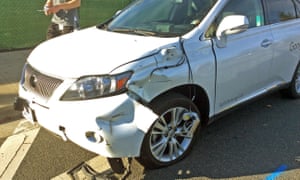
A self-driving Lexus SUV, operated by Google, after colliding with a public bus in Mountain View, California, in February 2016. Photograph: AP
In catch-22 traffic emergencies where there are only two deadly options, people generally want a self-driving vehicle to, for example, avoid a group of pedestrians and instead slam itself and its passengers into a wall, a new study says. But they would rather not be travelling in a car designed to do that.
The findings of the study, released on Thursday in the journal Science, highlight just how difficult it may be for auto companies to market those cars to a public that tends to contradict itself.
“People want to live a world in which everybody owns driverless cars that minimize casualties, but they want their own car to protect them at all costs,” Iyad Rahwan, a co-author of the study and a professor at MIT, said. “And car makers who offer such cars will sell more cars, but if everybody thinks this way then we end up in a world in which every car will look after its own passenger’s safety … and society as a whole is worse off.”
Through a series of online surveys, the authors found that people generally approve of cars that sacrifice their passengers for the greater good, such as sparing a group of pedestrians, and would like others to buy those cars, but they themselves would prefer to ride in a car that protects its passengers at all cost.
Several people working on bringing self-driving cars to market said that while the philosophical and ethical question over the two programming options is important to consider, real-life situations would be far more complex.
Brian Lathrop, a cognitive scientist who works on Volkswagen’s self-driving cars project, stressed that in real life there are likelihoods and contingencies that the academic example leaves out.
“You have to make a decision that the occupant in the vehicle is always going to be safer than the pedestrians, because they’re in a 3,000lb steel cage with all the other safety features,” said Lathrop, who was not involved in the new study.
So in a situation in which a car needs to, say, slam into a tree to avoid hitting a group of pedestrians, “obviously, you would choose to program it to go into the tree,” he said.
A spokesman for Google, whose self-driving car technology is generally seen as being the furthest along, suggested that asking about hypothetical scenarios might ignore the more important question of how to avoid deadly situations in the first place.
The problem seems to be how to get people to trust cars to consistently do the right thing if we’re not even sure we want them to do what we think is the right thing.
The study’s authors argue that since self-driving cars are expected to drastically reduce traffic fatalities, a delay in adopting the new technology could itself be deadly. Regulations requiring self-driving cars to sacrifice their passengers could move things forward, they write. But, in another catch-22, forcing the self-sacrificing programming could actually delay widespread adoption by consumers.
Susan Anderson, an ethicist at the University of Connecticut, and her husband and research partner, Michael Anderson, a computer science professor at the University of Hartford, believe the cars will be able to make the right call.
“We do believe that properly programmed machines are likely to make decisions that are more ethically justifiable than humans,” they said in an email. “Also, properly programmed self-driving cars should have information that humans may not readily have,” including precise stopping distance, whether to swerve or brake, or the likelihood of degree of harm.
How to get those cars “properly programmed”? The Andersons, who were not involved in the study, suggest having the cars learn from or be given “general ethical principles from applied ethicists”.
Despite what science-fiction wisdom says, talking to your computer is not normal. Sitting in the middle of a modern, open floor-plan office and saying „Hello, Computer,“ will garner some head-turns and a few scowls.
No matter. Companies like Microsoft, Amazon and Apple are convinced we want to talk to everything, including our desktop and laptop computers. Side-eye looks be damned.
Which brings us to today. Almost a year since Microsoft brought Cortana to Windows 10, Apple is following suit with Siri for the newly rechristened macOS.
Windows 10 with Cortana is, obviously, a shipping product, while macOS with Siri integration is in early beta. Even so, I can’t look at Siri’s first desktop jaunt in a vacuum, so when Apple supplied me with a MacBook running the beta of macOS Sierra (due to come to consumers in the fall), I compared the two desktop-based voice assistants. As you might surmise, they’re quite similar, but they have significant and strategic differences.
Where did they come from?
Siri arrives on the desktop as the oldest of the growing class of digital assistants, appearing first on the iPhone 4S in 2011. It’s long been rumored that it would eventually come to the Mac, so no one was surprised when Apple announced exactly that earlier this month at its Worldwide Developers Conference.
Cortana (which was named for the synthetic intelligence in Microsoft’s popular Halo game series), arrived with Windows 10 in 2015, a year after the digital assistant’s formal introduction on Windows Phone at the 2014 Microsoft Build conference.
Siri lives in two spots on the desktop and asks you to let the system know your location.
Image: Apple
Like Cortana, Siri has a permanent place on the macOS desktop. Actually, it has two. A tiny icon in the upper right corner and then another in the macOS dock. Both launch the familiar Siri „waiting to help you“ wave.
On Windows, Cortana sits next to the Start Button. it has a circular halo icon and, next to that, the ever-present „Ask me anything.“
A click on the Cortana logo opens this Cortana window.
Image: microsoft
It’s at this point that the two assistants diverge. Cortana is a voice assistant, but, by default, it’s a text-driven one. Most people who use it will type something into the Cortana box. If you want to speak to Cortana — as I did many times for this article — you have to click the little microphone icon icon on the right side of the Cortana box.
While Cortana combines universal search with the digital assistant, Apple’s Siri drawn a line between the two.
Importantly, you can put Cortana in an always-listening mode, so it (she?) will wake when you say „Hey Cortana.“ Even though you can also wake the mobile Siri with „Hey Siri,“ macOS offers no such always-listening feature. For the purposes of this comparison, I left „Hey Cortana“ off.
Siri is a voice assistant. It has no text box. A click on either Siri icon opens the same black box in the upper right-hand side of the macOS desktop (it actually slides in from offscreen — a nice touch). As soon as you hit that button, Siri is listening, waiting for you to ask a question.
Sitting right next to Siri is Spotlight, which last year got a significant update. It’s a universal search that can pore over you Mac, the Web, iTunes, the App Store, maps.
So while Microsoft’s Cortana combines universal search with the digital assistant, Apple’s drawn a line between the two — sort of. Spotlight can perform many of the same searches as Siri. However, if you type a question into Spotlight, it may launch Siri. A trigger word appears to be „What’s.“
I really don’t know why Apple chose to keep Spotlight and Siri separate, but they may reconsider in future versions of macOS.
Battle of the assistants
It’s early days for Siri on the desktop, but I’m already impressed with its performance and intelligence — especially as it compares to Microsoft’s Cortana.
To test the two voice assistants, I first closed my office door. I wanted to speak in a normal voice and didn’t want to attract any annoyed stares.
Both Siri on macOS and Cortana start by asking you to open up your privacy settings a bit. They simply do their jobs better if they know where you are. So I followed Siri’s instructions and turned on location services on the macOS.
Here’s something else Siri on macOS and Cortana have in common: Both can tap into your system to, for example, find files and make system-level adjustments, but they’re both pretty inconsistent. Siri on macOS, obviously, is still a work in progress, so take these criticisms with a grain of salt. Even so, I suspect that there will, at least for some time, be limits to what Siri can do even after the forma macOS launch, especially as long as Spotlight survives.
When I asked Siri to „increase my screen brightness,“ it opened a System Preferences: Brightness slider box within Siri and told me „I made the screen a little brighter.“
Impressive.
When I asked Cortana the same question, it opened a Bing search result inside the Cortana box, which told me how to adjust screen brightness, but didn’t do it for me.
On the other hand, when I told Cortana to turn off my Wi-Fi, it turned it off, it returned a message of „Wi-Fi is now off“ and showed the setting to confirm.
On the left is how Cortana handles voice commands for turning on and off Wi-Fi. On the right is how Siri does it. When you turn off Wi-Fi (networking), you basically disable Siri.
Image: APPLE/MICROSOFT/COMPOSITE/MASHABLE
Siri can turn off Wi-Fi, too, but doing so also renders Siri for macOS useless. Unlike Cortana, it needs an Internet connection to work, which means once Siri on macOS has turned it off, you can’t use it to turn Wi-Fi back on. Even if you turn off network connectivity, Cortana will still be able to search your system.
Siri and Cortana excel at natural-language queries (asking questions in sentences), but Siri comes across as the smarter system.
It’s easy to check your schedule through both systems — you just need to ask one of them about your next appointment. However, Siri goes a big step further.
Changing you schedule should be this easy everywhere.
Image: apple
When I asked it about my next appointment, it showed me one for Thursday at 11:00 a.m. I then clicked the microphone icon below the calendar result and asked Siri, „Can you move that to 11:10.“ Siri responded, „Okay, I’ll make that change to your event. Shall I reschedule it?“ It then offered the option of confirming the change or cancelling it with my voice. Siri on macOS actually maintains the context between queries — that feels more like the future.
When I asked Cortana to make a similar change, it sent me to a Bing search result. (By the way, both voice assistants use Bing and neither will let you change it to Google.)
The level of conversational prowess in Siri could be a real game-changer and certainly puts Microsoft on notice.
These are questions I can’t just ask Cortana.
Image: apple/composite/, mashable
Cortana and Siri on macOS both boast system access, but Siri does a better job of keeping track of system specs. I can ask about the speed of my system and how much iCloud storage I have left in Siri. Cortana, unfortunately, has no clue about my OneDrive storage and when I asked „How fast is my PC?“ I only got a Bing search result.
Where’s my stuff and who are you
Siri and Cortana each do a good job of finding system files that contain a keyword. For both, I asked, „Find me files with [keyword],“ and they both quickly showed me local, relevant results. Siri, however, excels at making results persistent. You can pin whatever you find to the notification center.
On the left you can see that Cortana does a good job with image search, but won’t let me drag and drop from the window. On the right, Siri on macOS found me puppy pics and let me drag and drop one into an email that I plan to send to you.
Image: apple/microsoft/composite/mashable
Similarly, both voice assistants do a good job of finding images, but only Siri on macOS lets me drag and drop one of the image results into a document or email. When I tried to do the same thing with a Cortana result, it only dragged and dropped the HTML for the original query.
Siri did struggle with contacts. I tried initiating a text and got stuck in a sort of infinite loop — it just kept going back to asking me which of my duplicate contacts I wanted to text. This felt like a pre-release bug.
No winners yet
Since Apple is still working Siri for macOS, it’s way too soon to crown a voice-assistant champion. Even so, Siri on mac OS is already faster (Cortana’s voice recognition seems plodding by comparison) and it’s already outstripping Cortana on the intelligence front. On the other hand, Cortana truly shines when you can type into it, a feat impossible in Siri for macOS, unless you start in Spotlight and use one of the magic words to auto-launch Siri.
Microsoft, of course, has its own big Cortana update in the wings as part of the Windows 10 Anniversary Update due later this summer. It will increase Cortana’s intelligence and utility (order plane tickets, shop), but based on what I’ve seen in Siri for macOS, it may only help Cortana achieve parity on some features, while still leaving it trailing in others.
When Apple released a preview version of iOS 10 at its annual developers conference last week, the company slipped in a surprise for security researchers — it left the core of its operating system, the kernel, unencrypted.
“The kernel cache doesn’t contain any user info, and by unencrypting it we’re able to optimize the operating system’s performance without compromising security,” an Apple spokesperson told TechCrunch.
Apple has kept the inner workings of the kernel obfuscated by encryption in previous versions of iOS, leaving developers and researchers in the dark. The kernel manages security and limits the ways applications on an iPhone or iPad can access the hardware of the device, making it a crucial part of the operating system.
Although encryption is often thought to be synonymous with security, the lack of encryption in this case doesn’t mean that devices running iOS 10 are less secure. It just means that that researchers and developers can poke around in the kernel’s code for the first time, and any security flaws will come to light more quickly. If flaws are revealed, they can be quickly patched.
Leaving the kernel unencrypted is a rare move of transparency for Apple. The company is so notoriously secretive about its products that some security experts speculated in the MIT Technology Review that the lack of encryption in the kernel was accidental. But such a mistake would be so shocking as to be practically unbelievable, researchers said. “This would have been an incredibly glaring oversight, like forgetting to put doors on an elevator,” iOS security expert Jonathan Zdziarski told the MIT Technology Review.
Apple has begun to shift towards greater transparency, particularly on security issues, in the wake of its battle with the FBI over unlocking an iPhone used by the San Bernardino shooter. When the FBI attempted to compel Apple to unlock the phone, CEO Tim Cook penned a rare open letter to Apple’s customers, explaining his decision to resist. “We feel we must speak up in the face of what we see as an overreach by the U.S. government,” Cook wrote. (The FBI eventually dropped its request after paying a third party to break into the device.)
Opening up the kernel’s code for inspection could weaken the market for security flaws like the one the FBI is presumed to have used to get into the San Bernardino iPhone. If flaws are revealed quickly and widely, it will reduce the prices law enforcement and black markets will pay for them — and it could mean quicker fixes for Apple’s customers.
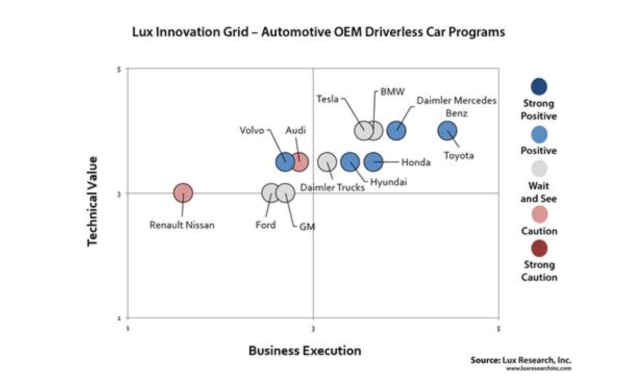
Automakers have spent the majority of 2016 announcing their plans for self-driving and the future of automation, but while some just begin to prototype systems, others are soaring ahead of the pack.
Research and advisory firm Lux Research has charted the 12 major automakers on business execution and technical value, and noted if the company has a positive or negative view on the advent of self-driving.
Toyota, Honda, and Mercedes Benz are ahead right now, as you can see in the graph above. Tesla and BMW aren’t far behind, but the report claims that the two companies have a “wait and see” attitude to self-driving, rather than actively pushing for its arrival. The attitude is based on investments, partnerships, and demonstrated capability.
Daimler Trucks and Hyundai are the other two automakers in the top right on technical value and business execution. German automaker Audi has a decent technical value rating, but lacks the investment or business execution its German rivals BMW and Mercedes-Benz have achieved.
The two major automakers in the U.S.—General Motors and Ford—have similarly poor outlooks. The two companies are lower than all European rivals on technical value and business execution, apart from Renault-Nissan, which is far behind the group.
Self-driving car R&D market is white hot
General Motors has started spending heavily in the self-driving market, investing $500 million in a partnership with ridesharing app Lyft and purchasing Cruise Automation for $1 billion in March. Ford, on the other hand, may be looking to partner with Google to fix some of its self-driving shortcomings.
While it is worrying to see companies like Renault-Nissan and Audi not invest in self-driving as much as rivals, we are still three years away from any concrete legislation that allows driverless cars on the road. That is enough time for any automaker to change their attitude towards self-driving.
It’s not your imagination: Millennials really are glued to their smartphones.
Nearly four in 10 millennials (39%) say they interact more with their smartphones than they do with their significant others, parents, friends, children or co-workers, according to a survey of more than 1,000 people released Wednesday by Bank of America. That’s compared with fewer than one in three people of all ages who say they engage with their smartphones more.
This means that, on an average day, millennials — defined here as being ages 18 to 34 — “interact with their smartphone more than anything or anyone else,” the survey concluded.
This may not surprise anyone who has looked at millennial smartphone usage. More millennials (77%) own smartphones — and spend more time on them (over two hours a day) — than any other age group, according to a 2014 report that examined the behavior of more than 23,000 adults, and was released by Experian.“In fact, millennials spend so much time on their smartphones that they account for 41% of the total time that Americans spend using smartphones, despite making up just 29% of the population,” the report concluded.
Furthermore, nearly half of millennials — significantly more than any older age group — say they “couldn’t live without” their smartphone, according to data released in 2015 by the Pew Research Center, a nonprofit and nonpartisan think tank in Washington, D.C.
Millennials are also far more likely to use their smartphone as a social escape: More than seven in 10 millennials say they have used their smartphone to avoid a social interaction, compared with fewer than half (44%) of others, according to the Bank of America data.
To be fair, millennials have many compelling reasons for using their smartphones: Experian data show that roughly one in five millennials (again, more than other age groups) use their phones to read the news during a typical week, and millennials are more likely than other cohort to use their phones to stay in touch with friends. What’s more, Pew data shows that millennials are more likely than other groups to use their phones to look at educational content, find and apply for jobs and learn more about a health condition.