http://lumiaconversations.microsoft.com/2015/04/01/microsoft-launches-ms-dos-mobile/
Today Microsoft launches MS-DOS Mobile, a new OS designed especially for Lumia smartphones.
Microsoft is going back to where productivity started for millions of people, launching a beautifully simple OS.
The MS-DOS Mobile preview is an essential download. Whether you’re going back to BASIC, or simply booting into DOS for the first time, MS-DOS Mobile marks the next step in Microsoft’s reinvention of productivity.
The OS allows you to run a number of already installed applications, while the sleuths amongst you will delight in uncovering a few extra special features – all through the medium of the much-loved C:\ prompt.
To find out how, and to learn about the story behind it, watch our exclusive launch video.

Daniel Glass who led design on the project, said:
“Turning our back on graphics was hugely liberating. We’ve dropped the resolution, and in doing so re-discovered our roots.”
“The inspiration for the graphical design is Courier New meets film noir.”

Tom Messett, from the marketing team at Microsoft Lumia, said:
“MS-DOS Mobile allows us to look proudly back, while at the same time moving us defiantly forwards.”
“It’s simple, effective productivity re-imagined through the medium of DOS. “

Designed to complement the heritage feel with a new-age operation, MS-DOS Mobile has been re-built from the ground up.
Do you remember MS-DOS? Or is it the stuff of computing legend that you’re getting your hands on for the first time? Let us know what you think in the comments below.
#AchieveMore
http://www.windowscentral.com/microsoft-launches-ms-dos-mobile
Today, Microsoft has launched MS-DOS Mobile, a new OS designed especially for Lumia smartphones. In case you didn’t know, MS-DOS was installed on millions of desktops. Well, now you can install it on your phone. „Black and white text has never looked so good,“ says Tom Messett from Microsoft Lumia Marketing in the launch video. Watch the video to see glimpses of the new/old OS before deciding if you should install it on your phone.
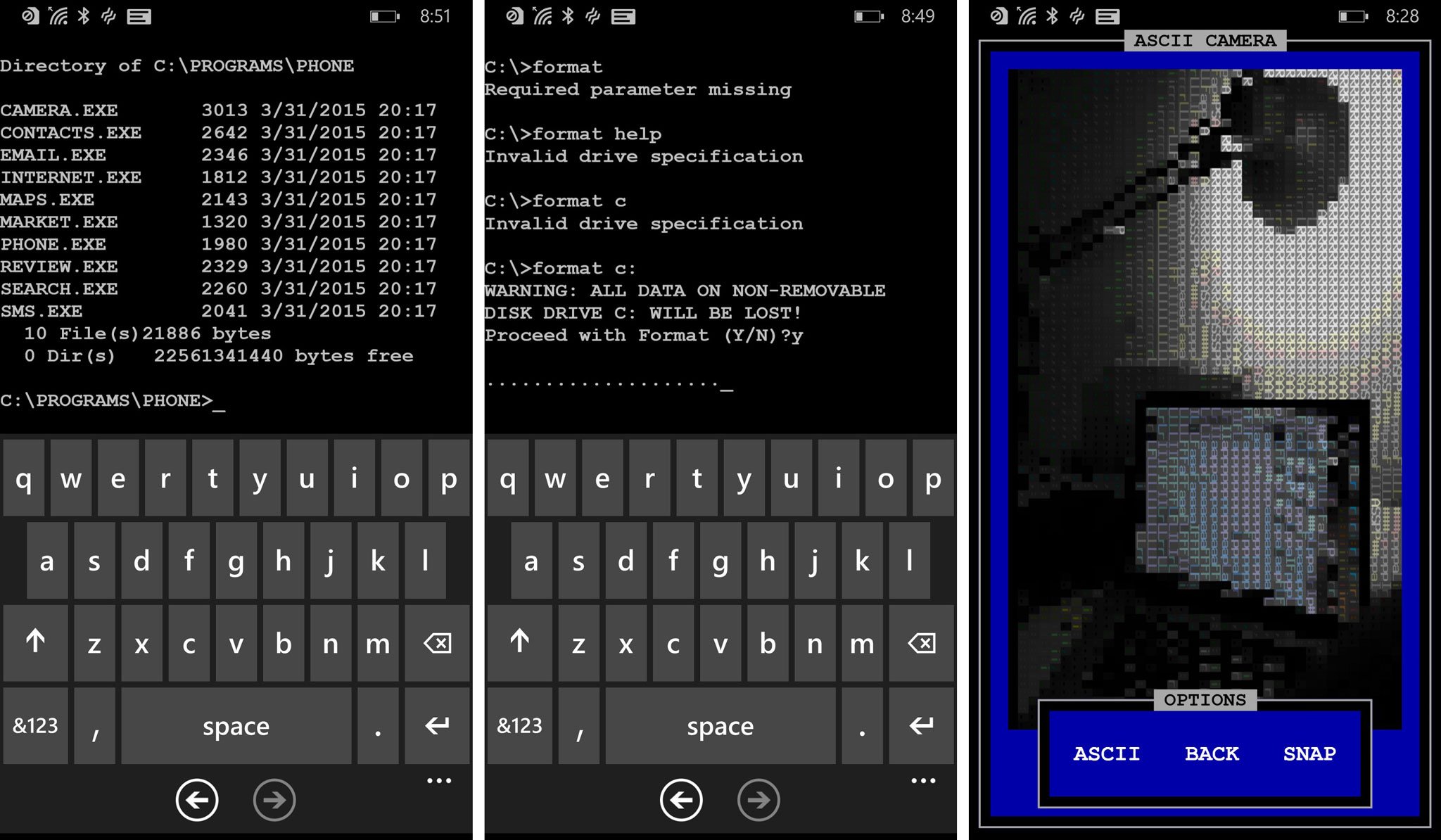
MS-DOS Mobile goes back to the basics. The user type commands to the prompt to access files and folders. The main apps are located in C:\PROGRAMS\PHONE. You can access that by typing these commands:
This lists all the available apps. For example, typing camera.exe in the next line launches the camera. The camera has three modes: ASCII, B&W, and CGA. You can also switch between the front and rear camera.

The ‚internet.exe‘ command in the same folder opens up Internet Explorer. You’ll briefly hear connecting sound before launching the app. There are several other programs that you can check out:
- Contacts – Opens the contacts list.
- Email [address] – After user types a message and presses the done button in the application bar, the platform’s email composer is launched
- Maps [search terms] – Launches the map app with search terms
- Market – Launches Windows Phone Store
- Phone [number] – Launches phone app with given number
- Review – Launches review page for this app
- Cortana [search terms] – Launches Cortana with the search terms
- SMS [number] – Launches SMS composer with the number
Before you start complaining how ridiculous this sounds, go check today’s date. It’s April Fools Day! Isn’t this kind of funny? We don’t want to ruin all the fun, so we suggest installing the app and navigating through the command prompts. Watch and re-watch the video for some Easter eggs as well. Hint: there’s an interesting game you can play.
Download MS-DOS Mobile for Windows Phone (Free)




 TheIdea – The Innovation Agency